Required Bot Permissions
The bot requires a few permissions to work completely and without issues. Typically, all necessary permissions are automatically granted to the EasyPoll role when the bot is invited. However, in some cases, the inviter may revoke certain essential permissions, resulting in the bot stop working properly.
Required permissions
| Permissions | Required | For what? |
|---|---|---|
| Send Messages | ✅ | To send poll and help messages |
| Send Messages in Threads | ✅ | To send poll and help messages in Threads |
| Read Messages/View Channels | ✅ | To read and receive poll messages |
| Read Message History | ✅ | To receive old polls and to be able to close them |
| Manage Messages | ✅ | To move poll messages and remove votes |
| Pin Messages | ✅ | To pin the poll message while a poll is running |
| Embed Links | ✅ | To send and update poll message embeds |
| Add Reactions | ✅ | To add the answer reactions for reaction-based polls |
| Use External Emojis | ✅ | To use custom emojis, even from other servers |
| Mention @everyone, @here, and All Roles | ✅ | To mention roles and users in poll messages |
| Create Public Threads | ✅ | To create threads for polls |
| Manage Threads | ✅ | To manage/close threads for polls |
| Attach Files | ✅ | To send poll result exports and event logging directly as a file |
| Manage Webhooks | ✅ | To setup webhooks for a event logging channel |
| View Audit Log | ✅ | To remove active votes when a user is kicked or banned |
| Administrator | ❌ | Not required, but recommended if you're unfamiliar with or don't want to deal with channel permissions. Required to automatically set the bot's permissions correctly on the server and channel level in debug mode. |
How do I check if the bot has all permissions?
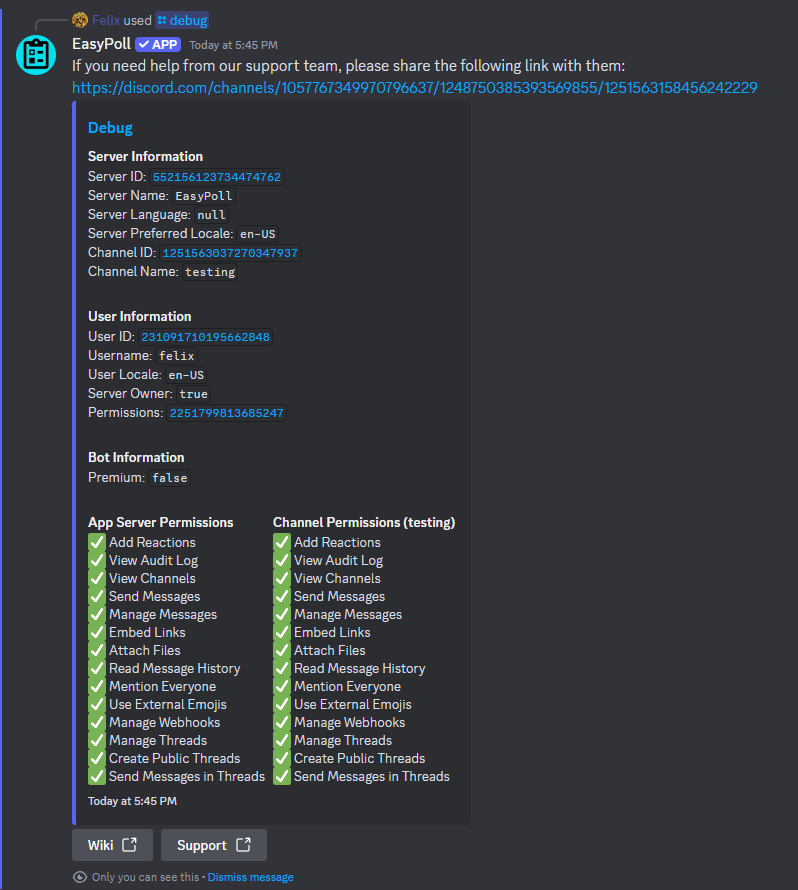
We have added a /debug command that allows you to check all the required permissions of the bot on server and channel level.
How do I set permissions at the channel level?
It is important that the required bot permissions are not overridden at the channel level.
If the bot does not have channel level permissions (because you are overriding it with the @everyone role, for example), you can set the permissions at channel level as follows:
-
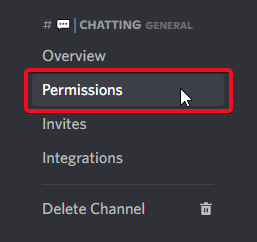
Go to the Channel Settings

-
Go to Permissions
-
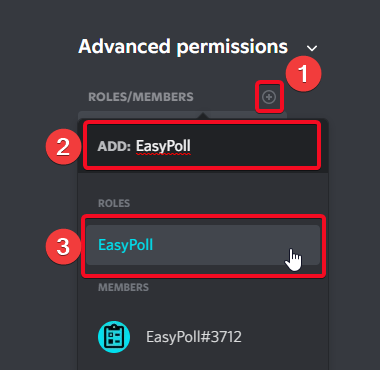
Add EasyPoll
-
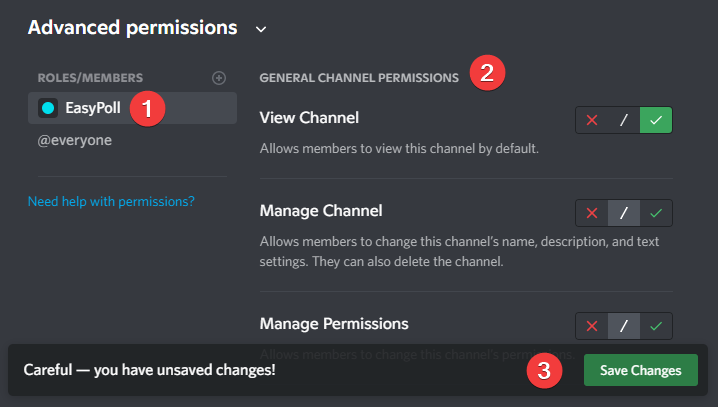
Select all required permissions and click save changes
What happens if the bot does not have all required permissions?
EasyPoll will try to work as well as possible, but you may run into problems, for example:
- EasyPoll cannot post the poll message at all, or
- The poll message does not update or show as closed when the poll ends, or
- Threads, pinning, or the winner announcement don't work, or
- Result exports and log messages can't be sent