FAQ
Here you'll find answers to the most frequently asked questions about EasyPoll. Can't find what you're looking for? Join our Discord server for support.
General
What is the bot prefix?
EasyPoll uses / (slash). All commands are Discord Slash Commands. Use /help to see all available commands.
Can I change the bot prefix?
No, the prefix cannot be changed. Discord uses Slash Commands to ensure consistency across all bots.
Where can I find the dashboard?
The dashboard is available at https://easypoll.bot/dashboard.
Who can access the dashboard?
By default, the server owner and users with Administrator or Manage Server permissions can access the dashboard. You can grant access to additional roles in the dashboard settings and choose exactly what each role is allowed to do, for example manage polls without being able to change server settings. Learn more about Dashboard Permissions.
Is there a premium version?
No, EasyPoll Premium is not available yet. Updates will be announced on our Discord server.
How can I report a poll or user?
Report polls or users that violate Discord guidelines on our Discord server. For general Discord violations, contact Discord directly.
Polls
How do I create a poll?
Use /poll to create a basic poll. For time-limited polls, use /timepoll.
What are the different poll types?
EasyPoll offers three poll types:
- Normal - Results are visible to everyone
- Hidden - Results are hidden, but admins can see who voted
- Anonymous - Complete anonymity, no one can see who voted
Learn more about poll types.
How can I use custom emojis?
Put the emoji in front of the answer: :emoji: answer or 🍕 Pizza. You can use Discord emojis, emojis from your server, and emojis from servers where EasyPoll is installed.
Can I create a poll with a time limit?
Yes, use /timepoll with the time option. Format: 10m, 3h, 1d, or 1d 3h 15m. Maximum duration is 30 days.

How can I allow multiple answers?
Use the maxchoices option in /poll or /timepoll to set how many answers users can select. Default is 1.

How can I add an image to a poll?
Add one image per poll by putting an image URL at the beginning of the text option when creating the poll, or add it later with /editpoll.
Only one image is supported per poll. To show multiple images, combine them into a single image.
Where can I find the poll ID?
The poll ID is shown in the footer of each poll message.
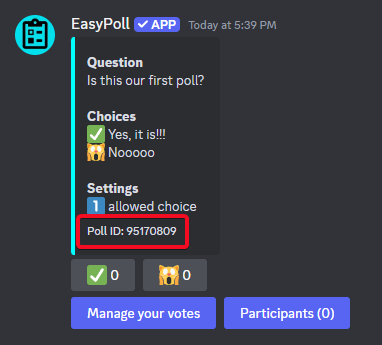
Can I edit a poll?
Yes, use /editpoll to modify the question, answers, settings, and more.
Can I close a poll?
Yes, use /closepoll or right-click the poll → Apps → Close.
Can I reopen a closed poll?
Yes, use /reopenpoll to allow voting again.
Can I delete a poll?
Yes, use /deletepoll to permanently delete a poll.
How can I copy a poll?
Use /copypoll to get a dashboard link that creates a new poll with the same settings. Perfect for recurring polls.
How can I schedule a poll?
Use /schedulepoll to publish a poll automatically at a specific date and time. You can also schedule polls through the Dashboard.
How can I see who voted for what?
Right-click the poll → Apps → Participants to see all voters and their choices.
Anonymous polls maintain complete anonymity - no one can see who voted for what.
How can I check results before closing an anonymous poll?
Use /listpolls or right-click the poll → Apps → Details to see current results without closing the poll.
How can I show final results?
Close the poll using /closepoll to display final results in the poll message.
Can I export poll results?
Yes, use /exportpoll to export detailed results including all votes and participants.
Can I see all polls on my server?
Yes, use /listpolls to view all polls, or check the Dashboard for a complete list with filtering options.
Permissions
Who can use the bot by default?
Users with the Manage Server permission can use all commands by default. Learn more about the Permission System.
How can I give certain users or roles bot permissions?
Go to Server Settings → Integrations → EasyPoll → Command Permissions. Configure permissions for each command, role, or channel. See Permission System for details.
Why can't some users use certain commands?
Check the command permissions in Server Settings → Integrations → EasyPoll. Verify that users have the required roles or permissions.
Does the bot need specific permissions?
Yes, the bot needs several Discord permissions to function properly. Use /debug to check if all required permissions are granted. See Required Bot Permissions.
Settings
Can I change the bot language?
Yes, use /settings language to change the language for your server.
Can I customize poll colors?
Yes, change embed colors with /settings colors embeds and button colors with /settings colors buttons.
Can I give certain roles more voting power?
Yes, use /settings role-weight to assign weight values to roles. A weight of 2 means each vote counts as 2 votes. Learn more in the Role Weight command documentation.
Can polls automatically create threads?
Yes, use /settings threads to automatically create and manage threads for each poll.
Can votes be automatically removed when users leave?
Yes, use /settings events to automatically remove votes when users leave, get kicked, or are banned.
Can I keep an audit log of poll actions?
Yes, use /settings logging to pick a channel where EasyPoll posts a log of poll and setting changes (created, closed, edited, deleted, and more).
Where can I see all server settings?
View and configure all settings on the Dashboard or use the various /settings commands in Discord.
API
Is there an API available?
Yes, EasyPoll provides a REST API for developers. Check out the API Documentation for all available endpoints.
How do I create an API key?
Go to the Dashboard, click on your profile, then navigate to API Keys to create and manage your API keys.